
Is your solar PV system not generating data or has your solar DB tripped? Don’t worry, this quick guide will help you safely check the issue and get your system back on track.
Part 1: What to do if your solar DB trips
Firstly, let’s get to know the components of your solar DB below: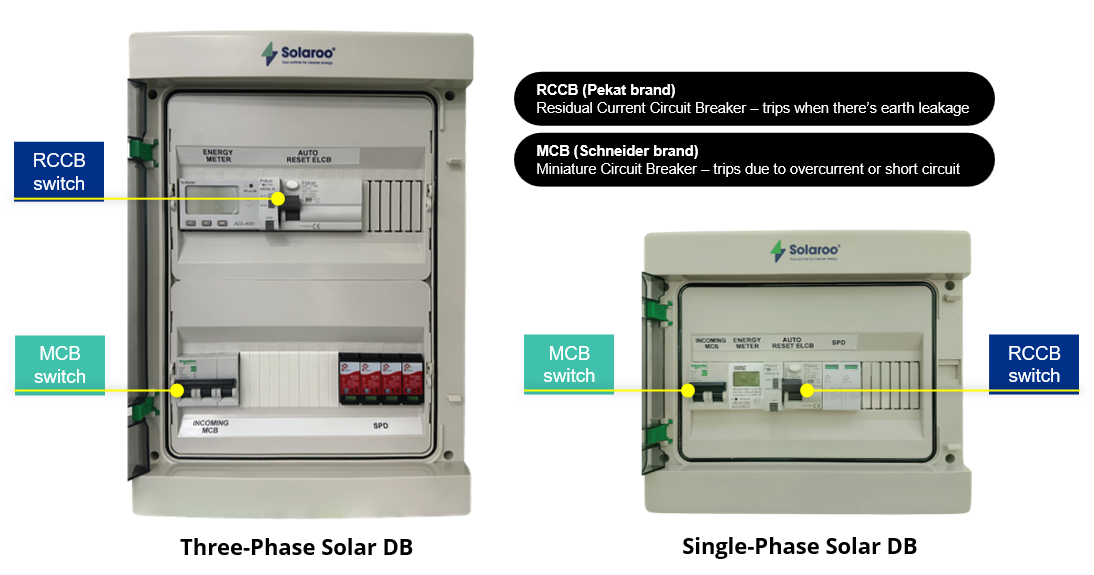
Now that you know your solar DB’s key components, follow these steps:
- Safety first:
- Make sure your hands are dry.
- Do not touch any exposed wires.
- Check for these DB scenarios:
- Scenario 1: If RCCB is DOWN > Push it UP to reset.
- Scenario 2: If both RCCB & MCB are DOWN > Push MCB UP first, then RCCB UP.

Observe what happens next:
-
- If it trips immediately after step 2 above – stop resetting further. Send us a photo/video via WhatsApp at 012-5928010 for further assistance.
- If both switches stay UP, your solar PV system is working fine. Continue to monitor via the Solaroo app.
Part 2: What to do if data is not showing in the Solaroo app
- Check your solar DB first:
- Repeat the safety steps as per Part 1 above.
- Ensure all switches, especially RCCB, are UP.
- If anything is DOWN, follow the solar DB trip steps under Part 1 above.
- Locate your DTU device
- The device is usually placed near your Wi-Fi router.
- Check the LED indicators on the DTU device:

Check your Wi-Fi:
Recently changed your WiFi password or router device?
➤ You will need to reconfigure the DTU if the Internet LED is flashing (Contact us via WhatsApp for assistance)
- Check your Solaroo app:
- All 3 lights (Power, Internet, Microinverter Signal) should be steady.
- Data on your app will be updated within 15 – 30 minutes upon reconfiguring your DTU.
Need More Help?
We’re here to support you! Just snap a photo and/or video of your Solar DB or DTU, and WhatsApp us at 012-5928010 for any assistance.